- Home Page
- Ergonomics
- Posture
Practice typing and your posture works together whilst carrying out your typing tasks in the office. Practice typing will work closely with you to make sure you stay healthy all day long whilst typing at your desk.
There is a statement people use regularly: "Your health is your wealth". This has proven true in the office even whilst typing. You cannot go wrong with that statement especially when sitting or standing for long hours.
Many people complain of eyestrain, back or wrist pain. They also at times experience swollen feet. It is all because of not using the healthy posture in the office.
People vary in shape and size so posture is important. Some people may only complain of back pain whilst others complain of swollen. It all depends on how you sit and for how long. The healthy typing posture should be carried out whether standing or sitting to type.
Are you experiencing the following?
- Do your shoulders ache?
- Do you experience stiffness and tension in your back?
- Do you experience some sort of fatigue?
- Do you feel cramps or pain in your fingers and forearms whilst typing?
You need not worry anymore. Practice typing is willing to share lots of practical advice with you concerning your typing posture at the office. You can even try it at home.
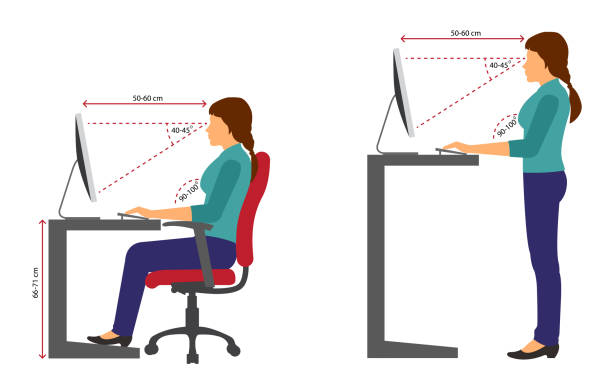
Practice typing and your posture has laid out the following tips. It can be of great help to you in overcoming the above experiences during typing.
Practice Typing And Your Posture - Feet
The height of the chair should be adjusted so that your feet are flat on the floor and your thighs are parallel to the floor. If your feet are too short and cannot reach the ground, place a box or some item under your feet to prevent it from hanging in the air.
Keep your feet slightly apart and braced firmly on the floor.
Never cross your legs or wind them around the chair. Remember the aim is to achieve a comfortable position which will avoid fatigue.
Practice Typing And Your Posture - Body
Your body should be relaxed, with the backrest of the chair adjusted so that it supports your back and not your shoulders.
Set the backrest so that you are leaning slightly forward. Never try to type leaning backwards.
Sit so that you are one hand-span from the front edge of the computer, which should be parallel to the edge of your desk.
It is very important that you are the right distance from the computer. Check this point every time you sit down to type.
Practice Typing And Your Posture - Fingers
Make sure that your finger-nails are not so long that they get in the way of the keys.
Your fingers should be in a curved postion so that only the tips touch the keys, while your hands should be at an angle of roughly forty five degrees to the computer.
The palm of your hands must be clear off the computer and the space bar in particular.
Practice Typing And Your Posture - Arms
Your arms should hang naturally at your sides with the elbows well in. Practice typing and your posture has observed that many typist are typing with their elbows far apart. They do so unknowingly but it is good to always tuck in your elbows to have a proper posture and most of all it is healthy to your body.
Practice Typing And Your Posture - Wrists
Practice typing and your posture advise that your wrist be straight not humped and your fingers curved. Strike each key lightly but firmly and evenly with the finger tip.
Make sure that only one key is struck at a time and allowed to return to its place before the next key is struck. This will avoid making mistakes.
Click on the link below to go back
Home or
Recent Articles


-
Practice-Typing Office Health
Practice typing offers a checklist for all typist to make a copy and always check daily to reduce physical strain whilst typing at their work station. -
Practice Typing And Coronavirus
Practice typing and coronavirus which is a global pandemic, can be very challenging for the office staff who has to travel to the office and use a computer. -
Learning To Type
I wanted to learn got type at the tender age of 14. In fact, I got very annoyed with my mother over it. Strange, but true. It was the school holidays,